
In this edition of our monthly roundup, we’re highlighting a few of our biggest updates from Microsoft Ignite 2025 and walking through new capabilities available today.
November 2025 was a busy month for Microsoft Copilot Studio, marked by major announcements at Microsoft Ignite 2025 and a wave of new features now rolling out to makers. It’s clear that organizations are moving beyond traditional automation and into a new era of agent-driven work. In this month’s roundup, we’re spotlighting our most significant Ignite updates and introducing powerful new capabilities you can start using today.
Copilot Studio enhancements and new features
From automation to outcomes: Ignite 2025 highlights
Microsoft Ignite 2025 underscored a clear trend: organizations are accelerating their shift toward agentic business transformation. Copilot Studio is the fully managed platform that enables them to build, govern, and scale AI agents across the enterprise. At Ignite 2025, we introduced new capabilities that create a more robust, secure agent creation experience for every user—from makers to professional developers to IT administrators.
Highlights included a redesigned conversational authoring experience, natural language file generation, and a seamless one-click upgrade path from Agent Builder in Microsoft 365 Copilot to Copilot Studio. That means business users can turn ideas into working agents faster, without waiting on development cycles and then expand when ready. This changes the game on how teams use technology to make a step change within a business process.
Makers now have even more flexibility with model choice across GPT-5 and leading third-party models, built-in agent evaluations, expanded computer use automation, and deep integration with more than 1,400 systems through Model Context Protocol (MCP), Power Platform connectors, and Microsoft Graph. In real-world terms, this removes the “user tax” of context switching and managing data silos. Whether you’re looking for help with invoice processing or supplier discovery, these agents bring collective insights to help drive a process forward.
For administrators, Ignite 2025 delivered major governance updates. These included expanded analytics and insights, real-time protection powered by Microsoft Defender, and new oversight capabilities through Microsoft Entra Agent ID that gives IT teams the confidence to scale AI safely.
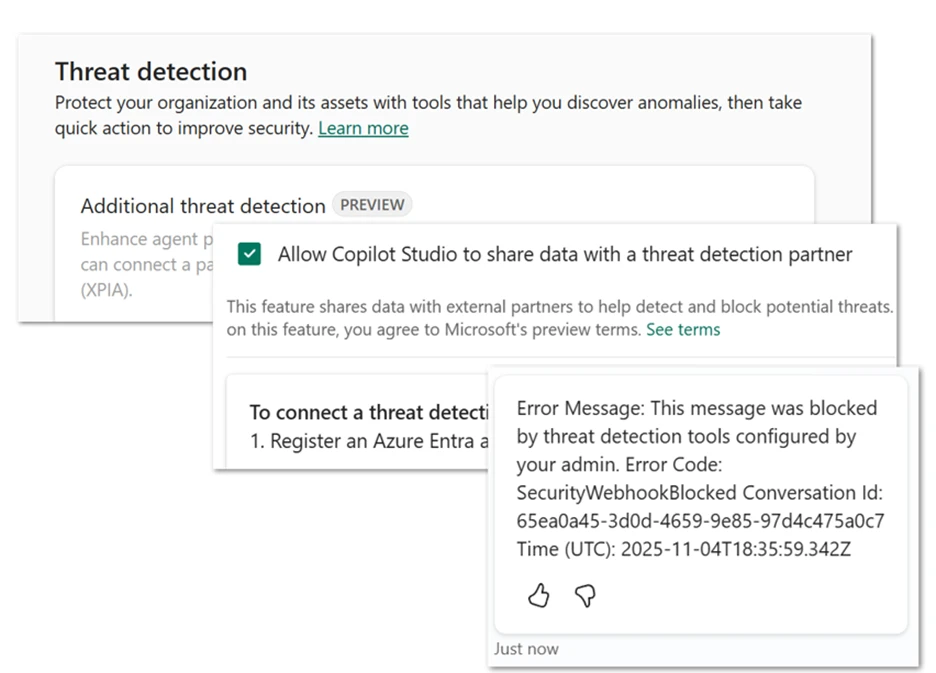
We also introduced Microsoft Agent 365, the unified control plane for enterprise agents. Agent 365 centralizes governance, policy management, and monitoring. This includes new MCP servers that allow agents to schedule meetings, generate documents, send emails, and update CRM records with full compliance and audit support.
To dive deeper into all the announcements, see our full Ignite 2025 recap: Why Microsoft Copilot Studio is the foundation for agentic business transformation.
GPT-5 Chat: Ready for production in Copilot Studio
GPT-5 Chat is now generally available in the European Union and United States. This means makers can confidently use this model in production scenarios for workloads that could benefit from GPT-5 Chat’s improved responsiveness, accuracy, and instruction-following. This means makers can confidently use this model in production scenarios for workloads that could benefit from GPT-5 Chat’s improved responsiveness, accuracy, and instruction-following.
You can enable GPT-5 Chat directly from an agent’s overview page. You can even set it as the primary model for scenarios like high-volume employee support or step-by-step process guidance.
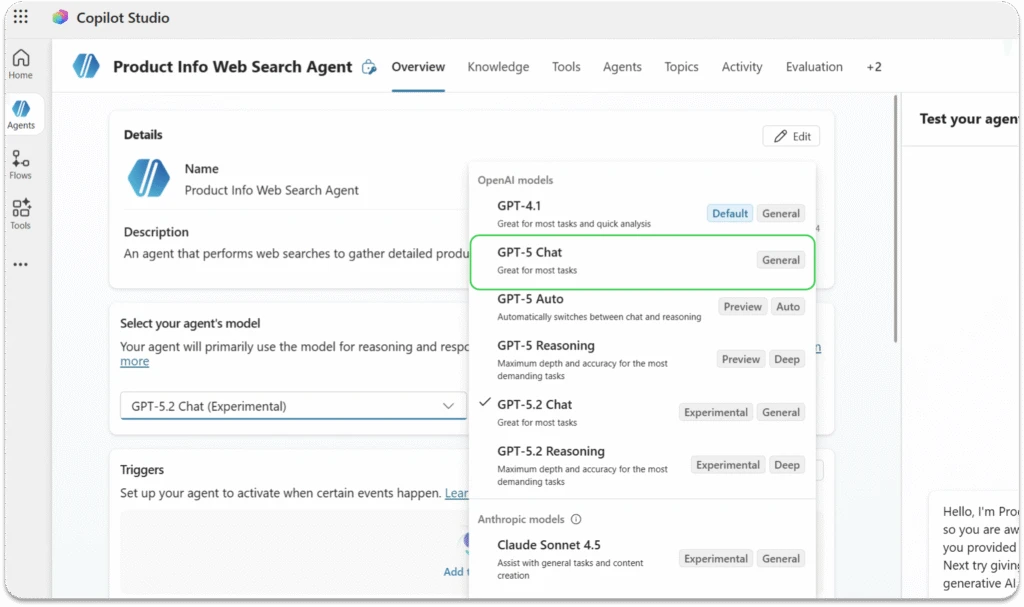
We’ve also started rolling out the GPT-5.2 series as experimental models for U.S. customers in early release environments. These models improve performance across the board, including coding and multilingual use cases. This replaces the GPT-5.1 series, including in any agents created using GPT-5.1 models. Since these models are experimental, they’re best suited for test scenarios rather than production—but they give you an exciting preview of what’s coming next.
You can read more about model choice and how to test them out in Copilot Studio.

Combine autonomous workflows with human judgment
One of the most important evolutions this month is human-in-the-loop (HITL), now in preview. This capability lets agents pause and ask for human input before moving forward. That may sound simple, but it fundamentally changes what organizations can trust agents to do.
With this feature, an agent can send a structured request (delivered as an Outlook form) to designated reviewers. Once the reviewer responds, the agent resumes and uses the submitted values as parameters. This provides real-time human judgment without disrupting the overall workflow.
HITL is especially useful when an agent needs clarification, additional context, or explicit approval to proceed. It supports scenarios such as confirming project updates, confirming procurement orders, validating financial reports, escalating complex customer support cases, resolving ambiguous data, or gathering information that only a person can provide. The result is more flexible and reliable automation that adapts to real-world conditions.
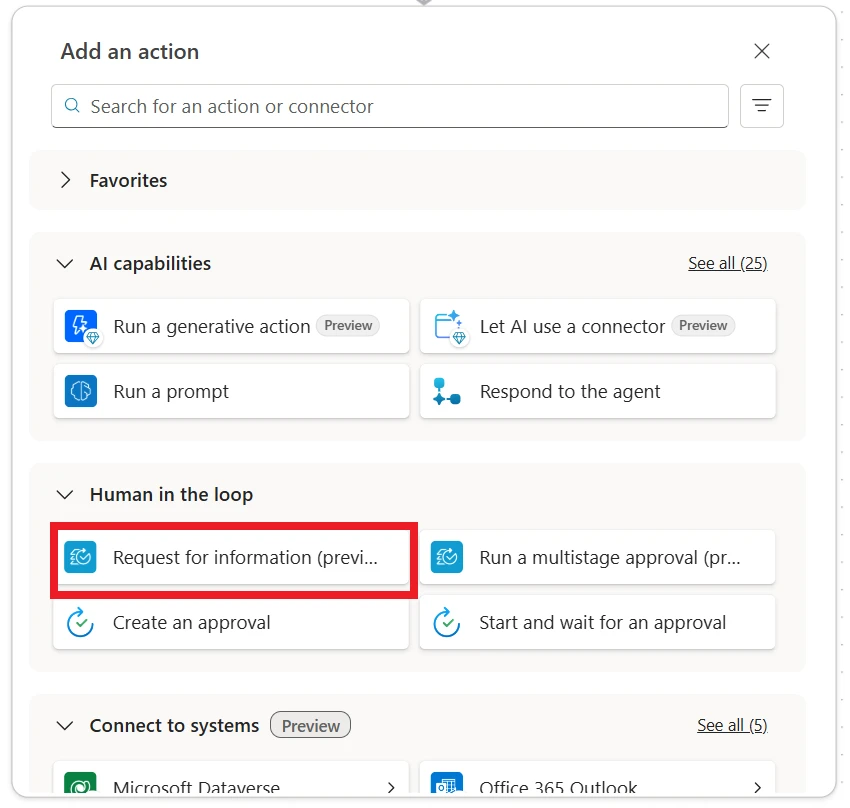
To use HITL, open the agent-building experience and select Add tool. Choose the request for information in Copilot Studio agent flows (preview) action under the Human-in-the-loop connector, then configure fields such as the title, message, assignee, and inputs. The agent will automatically trigger the request whenever the workflow calls for it. Learn more about request for information.
Add curated Outlook and SharePoint tool groups to agents for faster setup
Makers can now streamline agent configuration by adding curated Action Groups from Outlook and SharePoint connectors, now in preview. Instead of identifying and configuring individual actions one by one, teams can bring in complete sets of related tools, such as “manage emails” or “manage files,” with a single selection. This makes it easier to equip agents with the capabilities they need to support common workflows across communication and content management.
Each Action Group contains the most relevant and reliable tools for its scenario. Shared inputs automatically apply across the group to reduce setup time and improve consistency. Makers can either specify their own values or opt to have AI dynamically fill inputs based on context. Try it both ways—each action is fully editable even after it’s added. This flexibility helps ensure agents behave predictably while still allowing customization for unique business processes.
To use Action Groups, open an agent’s Tools section, select Add tool, choose Outlook or SharePoint, and pick the tool group you want to add. This provides a faster, clearer, and more guided way to build workflow-ready agents.
SharePoint grounding: Turning content chaos into decision clarity
Any team that uses SharePoint knows that it can sometimes be tough to find exactly the nugget of information you need among all your content. Fortunately, if you’re using SharePoint as a knowledge source, your agents just got a lot smarter. We shipped an upgraded tenant graph grounding architecture that improves how agents retrieve and rank information across your organization. This translates into more precise, more context-aware responses, especially in content-heavy environments.
On top of that, you can now filter SharePoint content using metadata like filename, owner, and last modified date. That gives you much tighter control over which documents your agents rely on when answering questions.
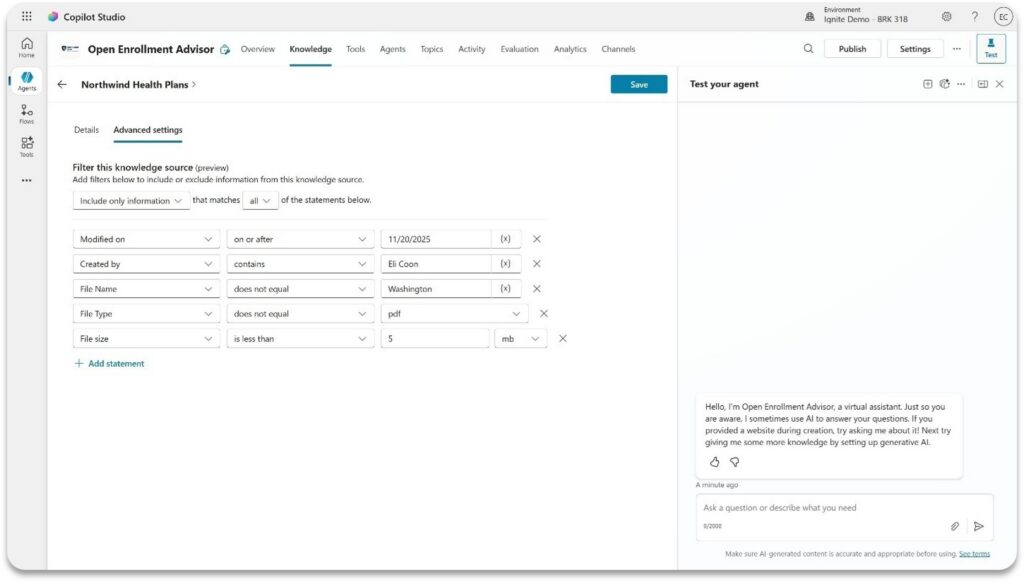
Learn more about these features and using SharePoint as a knowledge source.
Agent Builder enhancements and new features
Use the latest GPT-5 Chat capabilities in Agent Builder
Microsoft 365 Copilot now uses GPT-5 Chat when responding to prompts in agents created with Agent Builder. This brings immediate improvements to speed, quality, and accuracy in carrying out instructions. Organizations relying on agents built in Microsoft 365 Copilot will see immediate quality improvements in employee support, decision guidance, and informational use cases. No additional configuration or opt-in is required where GPT-5 Chat is available.
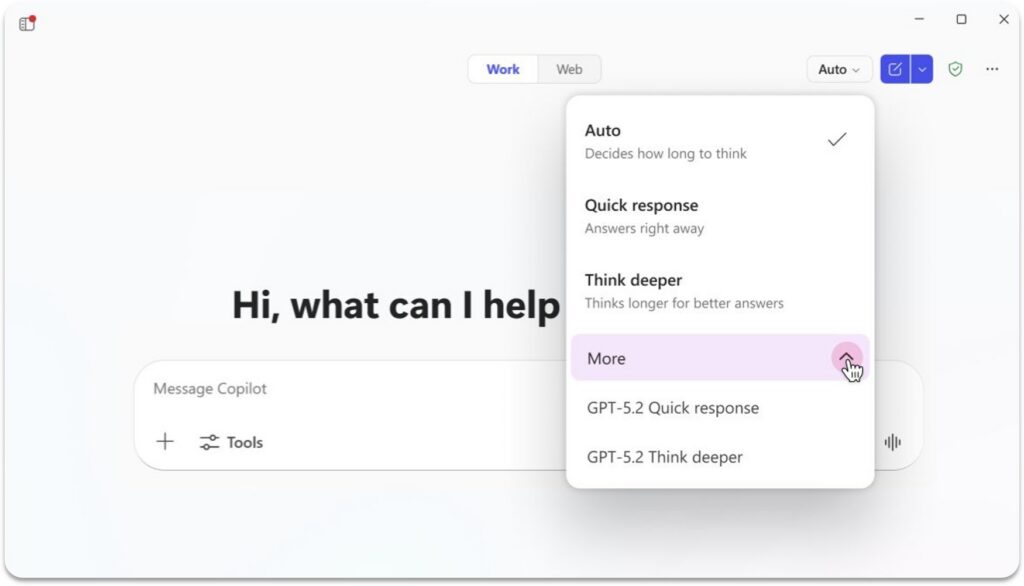
GPT-5.2 is also now available to use in Microsoft 365 Copilot with both web and work data. This new model series brings improved code generation and multilingual capabilities. Users with a Microsoft 365 Copilot license received priority access to GPT-5.2 on December 11, 2025, and the series is expected to be available to all users in the coming weeks.
Extend your agent seamlessly from Agent Builder to Copilot Studio
Makers can now seamlessly move agents built in Agent Builder (the lightweight agent-building experience inside Microsoft 365 Copilot) into the full Copilot Studio application using the new “Copy to Copilot Studio” action. This capability is generally available everywhere Agent Builder is supported.
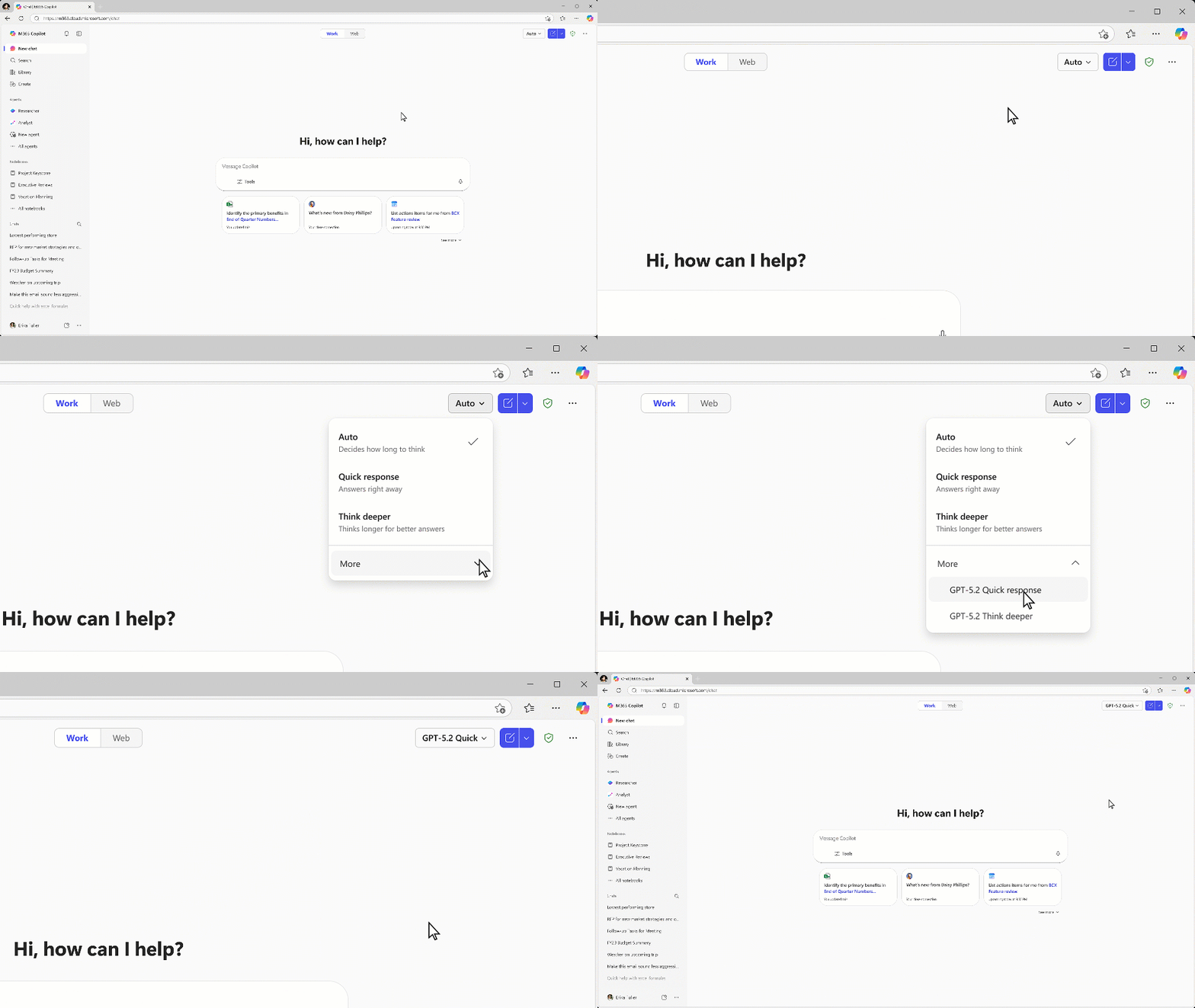
This feature allows makers to start prototypes quickly in Microsoft 365 Copilot and then expand them into fully governed, enterprise-ready Copilot Studio agents without rebuilding from scratch. The copy operation creates a version of the agent in the selected environment while preserving the original in Agent Builder. In addition to providing peace of mind, this means your users can still partake in the existing experience while the enhanced version is developed.
Once an Agent gets copied into Copilot Studio, makers gain access to a suite of richer
Dit artikel is afkomstig van Microsoft 365 Blog.
Lees het volledige artikelGerelateerde artikelen

Copilot at Microsoft Ignite: Expanding what’s possible with intelligence built for work
This morning, at Microsoft Ignite 2026, we shared how our vision for Copilot is becoming real for customers. Home, where Chat and Cowork come together, and Office in Copilot are now generally available. Code will become generally available in the coming weeks, while Copilot Managed Runtime for secur...

What AI at work really costs
As you hand off more work to AI, it’s worth comparing the total costs of the leading options, just like you would any other investment that helps you get work done. Today we’re sharing new research on how those costs compare across the same work, and a closer look at what drives the difference. Micr...

Bringing Claude models in Microsoft Copilot into the EU Data Boundary
Today, we’re announcing that Claude models by Anthropic in Microsoft Copilot are coming into the EU Data Boundary, strengthening model choice for organizations across Europe. This means customers will no longer need to choose between access to Claude models and the Microsoft regional data-processing...